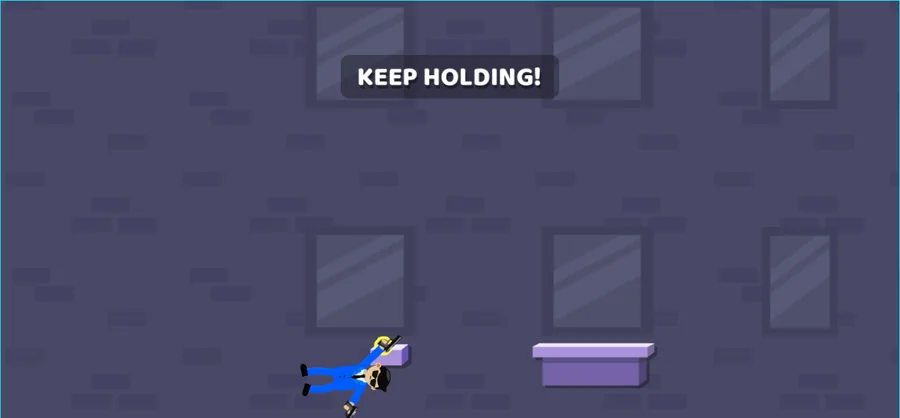
A browser game that shows one input and one line of text. The scene prints PRESS & HOLD! in a rounded bubble, later swaps it for KEEP HOLDING!, and the character works through a purple-grey wall of block tiles and framed windows toward the purple ledges below. No title, menu, timer or score appeared on screen.
LevelLoop wrote this play brief. The playable file, artwork, and runtime are delivered by an external game service. LevelLoop keeps supporting rights records for the catalog on file.
ShelfAction
Start and controls
Press and hold, then keep holding
Nothing stands between you and the play area. In the frames captured there is no title card, no menu and no button label, and the scene is already running when it appears; the only text the game printed was the prompt line. It arrived first as PRESS & HOLD! in a rounded bubble near the middle of the scene, and later in the same run as KEEP HOLDING!. Both wordings ask for the same thing, a press that stays down, so a quick tap is not the input this game is looking for.
Observed 2026-10-04 in Chrome at 1280×800: the play area with the KEEP HOLDING! prompt bubble centred over the block-tiled wall, and the character down beside a purple ledge at the lower left.
The hold is the whole control scheme
Because the screen never offers a second control, a first run is spent holding rather than choosing. Keep the press down while the bubble is up: the wording moves from PRESS & HOLD! to KEEP HOLDING! only once the run is under way, which makes that change the progress signal to watch. There is no other instruction on screen to fall back on, so the bubble is the only cue a run gives you.
What the play area actually prints
Two prompt strings, no numbers
The captured frames contain exactly 2 pieces of game text, PRESS & HOLD! and KEEP HOLDING!. No clock, no counter, no progress bar, no level name and no score panel appeared at any point, so this brief does not invent any. If you want a readout to steer by, the prompt wording is the only one the build puts on screen.
The scene around the prompt
The play area is a side-on view. Behind the character sits a purple-grey wall built from lighter rectangular blocks, with framed windows set among the tiles; a small lavender block stands at the bottom centre of the frame and a wider purple slab sits lower right. The character is small in frame, in blue trousers with a dark top and hat. Between the two prompts it went from tumbling mid-air near the centre of the frame to down beside a purple ledge at the lower left.
A short run, honestly read
What a first run can actually settle
This brief stays short on purpose, because the build shows no numbers to report. There are 2 things worth checking on a first run: that the prompt wants a hold rather than a tap, and that the wording changes from PRESS & HOLD! to KEEP HOLDING! while the press stays down. Those are the observations captured here, and nothing else was readable on screen.
Do not read a scoreboard that is not there
A run in this game gives you no total to chase: no points, no timer and no rank appeared in any of the captured frames. Judge the run by the prompt instead. If the bubble moved on from PRESS & HOLD! to KEEP HOLDING!, the hold was kept long enough for the game to acknowledge it.
Funny Agent FAQ
The hold prompt, and why there are no numbers
These answers describe only what the play area printed: 2 prompt strings, 1 input, and a tiled scene with purple ledges.
What is the only control Funny Agent shows?
A press that stays down. The scene prints PRESS & HOLD! in a rounded bubble, and later in the same run KEEP HOLDING!, so a tap will not do: keep the input held while the bubble is on screen.
Does the game show a clock, a score or a level number?
None of those appeared in the frames captured. The only game text on screen was the prompt line, with no counter, no progress bar, no timer and no menu label anywhere in the play area.
Why does the prompt change from PRESS & HOLD! to KEEP HOLDING!?
Because the run has moved on. PRESS & HOLD! came first and KEEP HOLDING! came after it in the same session, and both ask for the same sustained press, so the new wording works as a progress signal rather than as a new control.
What does the scene look like?
A side-on view of a purple-grey wall built from lighter rectangular blocks, with framed windows set among the tiles, a small lavender block at the bottom centre and a wider purple slab lower right. The character is small in the frame, in blue trousers with a dark top and hat.