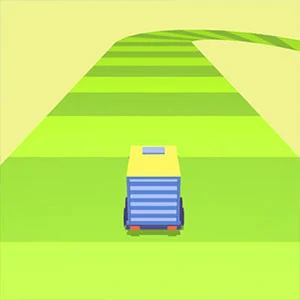
A narrow-road distance challenge built around small steering corrections and early preparation for bends.
Winding Road is a downhill run on a procedurally laid ribbon: every tile is 10 units wide and sits 2 units below the last, and steering is two keys on desktop or either half of the screen on a phone.
Winding Road is a downhill run on a procedurally laid ribbon: every tile is 10 units wide and sits 2 units below the last, and steering is two keys on desktop or either half of the screen on a phone.
Winding Road is a downhill run on a procedurally laid ribbon: every tile is 10 units wide and sits 2 units below the last, and steering is two keys on desktop or either half of the screen on a phone.
LevelLoop wrote this play brief. The playable file, artwork, and runtime are delivered by an external game service. LevelLoop keeps supporting rights records for the catalog on file.
ShelfRacing
The road itself
Fifty tiles, each two units below the last
The road is generated as you go. The build keeps 50 tiles alive around the player, each one 10 units wide and 10 long, and every tile's far edge sits 2 units lower than its near edge, so the course descends in steps rather than running flat.
The first fifteen tiles are straight
After that the heading changes every 10 to 20 tiles by 0.1 to 0.2 radians, roughly 6 to 11 degrees, and the turn direction is picked at random each time. The player object is a mesh the build calls truck, and it rides on 9 downward rays, one in the centre and eight around a 1.5-unit ring, each 5 units long. That ring is what decides whether you are on the road or in the air.
Controls and the opening
A and D, or half the screen each
The game's own tutorial lines read press A and D, or LEFT and RIGHT arrow, to steer, press SPACE to continue on desktop, and tap and hold, left and right part of screen, to steer, tap anywhere to continue on a phone. They are shown once: a hasShownTutorial flag decides whether your first run is the tutorial or the real thing.
Nothing steers for four seconds
Steering is deliberately dead for the first 4 seconds of every run, so the opening stretch cannot be wandered across. The score sits at the top centre in yellow (#f6c100) with a 5-pixel white outline, and it is the only live number on the screen.
On the title screen the only labelled control is PLAY, with a settings button beside it and a small square button below it that the build parks there because it leaves its More Games slot switched off.
Observed 2026-10-04 in Chrome at 1280×800: the title screen shows the Winding Road lettering over a green road graphic running away into the distance, with a single blue PLAY button and a small yellow button beneath it.
Darkness and number plates
Half a second in the air, then the screen dims
Fall for more than 0.5 seconds with steering live and the build starts washing the screen at 0.4 per second, in the same pale olive the menu uses. It reads as daylight draining out rather than a red warning, and when the wash reaches full the run ends and the revive screen opens.
Score is the plate you are standing on
Glasses on the road carry ten number plates reading 1 up to 10 and they spawn every 20 tiles. Touching one sets your score to that plate, and the speed multiplier is 1.5 plus 0.03 per point, so the tenth plate takes you to 1.8x. The revive screen's YES plays a rewarded video and drops you back into the same run with the darkness and the fall timer reset to zero; NO goes to the panel whose heading is GAME OVER, drawn in green over a Score row and a Best row.
Falling is not instantly fatal. Gravity is 100, top fall speed is 40, and a landing faster than 10 after 0.2 seconds in the air bounces you back up at 50 and switches steering off until you touch down again.
Road answers
Tiles, controls and the dark
These answers stay with what the build actually runs: the tile size and step, the two control schemes it prints, and what falling does to the screen.
Which control should I use in Winding Road?
On desktop, A and D or the LEFT and RIGHT arrows; SPACE continues. On a phone, tap and hold the left and right part of screen to steer and tap anywhere to continue. The game shows those lines once, on your first run.
Why can I not steer at the start of a run?
Steering is disabled for the first 4 seconds of every run. The opening is a straight and the build will not let you wander across it.
What ends a run?
Falling. After more than 0.5 seconds in the air the screen starts washing at 0.4 per second, and when the wash reaches full the run ends and the revive screen opens. YES plays a rewarded video and resumes the same run.
How is the score worked out?
The glasses on the road carry ten number plates reading 1 to 10 and spawn every 20 tiles. Touching one sets your score to that plate, and the speed multiplier is 1.5 plus 0.03 per point, so the tenth plate is 1.8x.
What does the title screen show?
A single blue PLAY button under the game logo, a settings button beside it and a small square button below it. The build's More Games slot is switched off in this version.