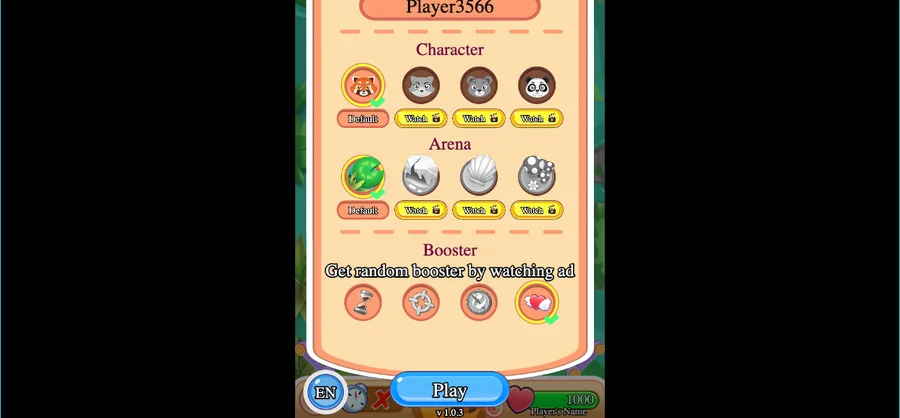
Bubble Fight.io opens on a Main Menu that asks for your name before anything else, then offers four characters, an arena and a booster slot filled by watching an ad. Matches run over a live connection with a turn order recorded move by move.
LevelLoop wrote this play brief. The playable file, artwork, and runtime are delivered by an external game service. LevelLoop keeps supporting rights records for the catalog on file.
ShelfArcade
The Main Menu
Four picks before one Play button
The game opens on a Main Menu that leads with a name field. Enter your name: sits above a box already filled with Player3566, and a name is required before anything else: the build carries the line Please enter your name to continue.
Observed 2026-10-04 in Chrome at 1280×800: the Main Menu asks for a name (the box reads Player3566), then lists Character, Arena and Booster above the EN toggle, the version string v1.0.3 and the Play button.
Character, arena and the ad booster
Under the name sit three sections. Character shows four animal heads — a red panda, a bear, a panda and a fourth that reads as either a wolf or a fox at this size — each row labelled Default with a Watch button beside it. Arena repeats the same shape with a Default pick and its own Watch button, and Booster is a single slot whose label reads Get random booster by watching ad.
The bottom bar holds the language toggle EN, the version string v1.0.3 and the Play button. The build confirms a booster with the line Watch an ad to get another booster?
What the build runs on
Two players on a live connection
This is a networked game rather than a solo arena. The build signs in anonymously, keeps a realtime database connection open, and records the other side by name, character and booster set: Opponent Name:, Opponent Char: and Opponent Boosters: are separate strings, next to Players Online: and an Opponent Left! notice.
Turn order, angles and grid positions
A match is resolved move by move. The build writes and reads First Move: and Second Move:, marks them with Got First Move! and Got Second Move!, and applies the other side with Apply opponent move!. Each incoming move carries Opponent moved! angle: and Opponent moved! MovePos: with it.
Board state is kept as Grid Pos:, with BubblesSnapPos: and BubblesToAdd! describing the bubbles that settle onto it. A run of them is announced as Combo x{0}!, and the match closes with either Player 1 Win! or Player 2 Win!.
The numbers on the menu
Wins counters and two four-digit readouts
Every pick carries its own Wins: 0 counter, so a fresh save shows zero under each character and each arena instead of one shared total. Nothing on the menu is added up for you: the row is the record.
9999 and 1000
Two four-digit values are printed on the menu. 9999 sits in the status strip beside the heart and the nameplate, and 1000 sits in the bottom bar next to the Play button. Neither value is labelled on screen, so the reliable reading is where each one appears rather than what it counts.
Characters and arenas are opened from this menu, and the Watch buttons are the route the game shows for the locked ones. The version string on this build is v1.0.3.
Bubble Fight.io FAQ
Names, picks and the menu counters
These answers stay with what the Main Menu shows and what the build records: a required name, three pick sections, and per-pick win counters.
Do I have to enter a name in Bubble Fight.io?
Yes. The Main Menu opens on Enter your name: with Player3566 already in the box, and the build carries the line Please enter your name to continue.
What are the three sections under the name field?
Character, Arena and Booster. Character shows four animal heads, Arena repeats the same row shape, and the Booster slot is labelled Get random booster by watching ad. Locked picks show a Watch button.
How many wins does a new save have?
Zero. Every character and every arena carries its own Wins: 0 counter, and the menu shows all of them at once rather than a single shared total.
Is Bubble Fight.io played against other people?
Yes. The build signs in anonymously, keeps a realtime connection, records Opponent Name:, Opponent Char: and Players Online:, and applies the other side with Apply opponent move!.
Which numbers appear on the menu?
Two four-digit values: 9999 in the status strip beside the heart and the nameplate, and 1000 in the bottom bar next to the Play button. Neither is labelled on screen.