LevelLoop wrote this play brief. The playable file, artwork, and runtime are delivered by an external game service. LevelLoop keeps supporting rights records for the catalog on file.
ShelfCasual
One canvas, two buttons
What the menu actually shows
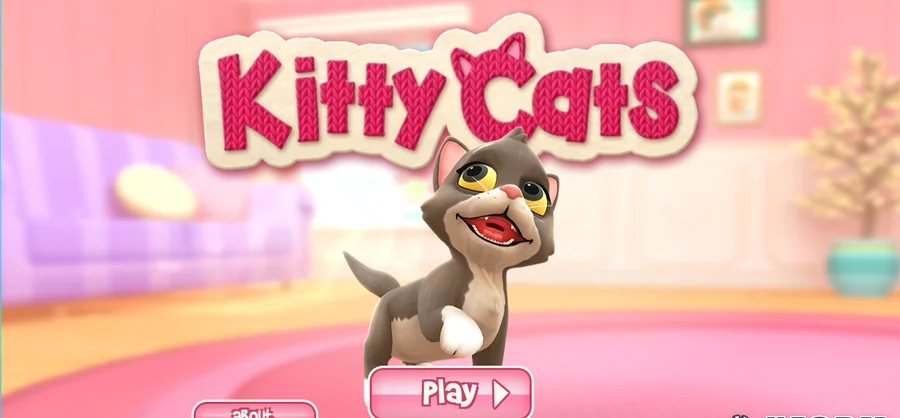
Kitty Cats is a Unity WebGL build by Xform Games, version 2.0, and it draws everything into a single canvas with no HTML menu underneath it. The only text on screen is the text the artwork carries: the title in a knitted wool style, a grey and white cat standing in a pink room, an about button, a Play button with an arrow, a sound toggle in the top right corner and the studio mark XFORM GAMES STUDIO in the bottom right. About two minutes passed between the player opening and that menu appearing.
Observed 2026-10-04 in Chrome, roughly two minutes after the player opened: the whole menu is one canvas - a knitted Kitty Cats logo, the cat, an about button and a Play button, with the studio mark in the bottom right corner.
The page hides how long the load took
The progress bar on the page is clamped on purpose: it substitutes 1 for any reported progress above 0.9, so the last tenth of the download always fills the bar instantly and the bar reaching the end tells you nothing. The page also fixes devicePixelRatio at 1 and hides its own mobile warning 5 seconds after the game starts.
What is not on screen
No level, no score, no timer
Nothing on the menu names a level, a score, a clock or an objective, and because the build renders into a canvas there is no hidden HTML text to read either. The only way to learn what the game asks of you is to get into it. Our session did not get past the menu, so this brief stops there rather than describe a loop we never saw.
Where the build lives
The loader sits at Build/KittyCats.loader.js and it pulls KittyCats.data.unityweb, KittyCats.framework.js and a WebAssembly module, with streamingAssetsUrl pointed at a StreamingAssets folder. The product string inside the page config reads Kitty Cats 2.0 and the company string reads XformGames.
One consequence of the single-canvas approach is worth knowing before you judge the game: if the canvas is blank, nothing else on the page will tell you why. There is no error text, no retry link and no placeholder - the page either draws the menu or it does not.
Before you open it
Give it the full two minutes
Open it on a desktop browser and wait for the artwork rather than for the bar. In our session the menu took roughly 120 seconds to appear, and the bar was already full well before that. Closing the tab as soon as the bar completes is the easiest way to conclude, wrongly, that the game is broken.
A realistic first session
Budget three minutes for the first look: about two of them are loading, and the rest is the menu. The player can turn the sound off from the toggle in the top right and read the about panel, but there is no in-game number to aim at yet and no way to judge a run from the menu alone.
The practical reason to keep the note short is that everything else would be guesswork. A guide that described feeding, cleaning or play tasks would be describing a game we did not see; what we can state is the platform, the studio, the version, the two buttons and the load time.
Kitty Cats FAQ
The menu, the load and the platform
These answers stay with what the build page and the captured menu actually carry, because the game itself never showed us a second screen.
What is on the Kitty Cats menu?
A knitted Kitty Cats logo, a grey and white cat standing in a pink room, an about button and a Play button with an arrow, a sound toggle in the top right corner and the mark XFORM GAMES STUDIO in the bottom right. There is no level list, score or timer on it.
Why does it take so long to open?
It is a Unity WebGL build pulling one 13,419,752 byte data file plus a 506,034 byte engine framework and a loader script. In our session the menu appeared after roughly two minutes, and the progress bar is not a reliable countdown because the page forces it to full as soon as real progress passes 0.9.
Can I play it on a phone?
The page states that WebGL builds are not supported on mobile devices. It still loads for a mobile user agent, but it hides that warning after 5 seconds rather than blocking the game outright, so a phone is a gamble rather than a supported way in.
Does this brief explain how the game plays?
No, and that is deliberate. Our capture session reached the menu and no further, and nothing on the menu names a level, a score or a clock, so this brief describes the build, the loading behaviour and the menu instead of inventing a loop we did not observe.