A spatial board that asks you to roll a rectangular block to a destination in the correct orientation.
Roll the Block is a sliding-block puzzle with 55 boards. You swipe once, every blue brick on the board slides together, and the board is clear only when each hole has a brick sitting in it.
Roll the Block is a sliding-block puzzle with 55 boards. You swipe once, every blue brick on the board slides together, and the board is clear only when each hole has a brick sitting in it.
Roll the Block is a sliding-block puzzle with 55 boards. You swipe once, every blue brick on the board slides together, and the board is clear only when each hole has a brick sitting in it.
LevelLoop wrote this play brief. The playable file, artwork, and runtime are delivered by an external game service. LevelLoop keeps supporting rights records for the catalog on file.
ShelfPuzzle
The board
Fifty-five boards, from 5 by 8 up to 8 by 13
The level list ships as one array of 55 boards and it does not keep a single shape. 39 boards are 7 columns by 13 rows, 10 are 8 by 13, four are 5 by 8, one is 5 by 9 and one is 6 by 9, so the board you get changes size several times across the run.
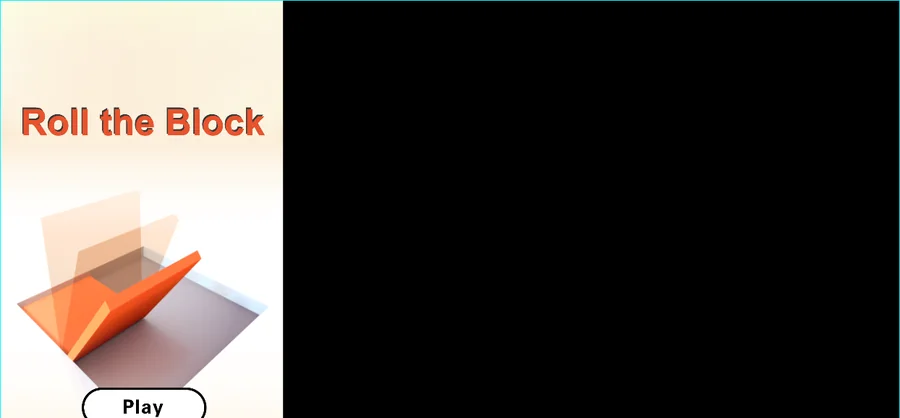
Observed 2026-10-04 in Chrome at 1280×800: the title screen shows the red-orange Roll the Block lettering on a pale background over an orange block with floating glass planes, with a white Play button beneath and no level or score anywhere on it.
Board one is a three-move lesson
Board 1 is 5 by 8, which is 40 cells, with exactly one blue brick and one hole. It ships its own solution: the stored tip list is three moves, all to the right, and the brick starts three cells from the hole on the same row. Board 2 is the same idea on the other axis, with two bricks sitting four rows below their two holes.
The cell types are readable straight out of the level data: 0 is empty, 1 is the blue brick the game calls INIT, 2 is a static orange brick, 3 and 4 are the horizontally and vertically movable bricks, and minus 1 and minus 2 are the two hole sprites.
The title screen itself keeps everything hidden: it is the red-orange Roll the Block lettering over a 3D block scene with a white Play button and nothing else, so no level number or score is on screen until a board loads.
How a swipe is read
A swipe, not a drag
Input is a press and a release anywhere on the stage. The build measures the distance between the two points and requires the horizontal and vertical distances to differ by at least 10 pixels, so a lazy diagonal flick is discarded rather than guessed at.
Everything blue moves as one group
A swipe left, right, up or down sends every blue brick to its mirrored position across the group's own bounding box, which is the spot the build calls mirrorPos. Orange bricks never move, and a hole is not an obstacle: it is the target.
After each swipe the build checks every hole cell, and it only declares the board clear when each one holds a blue brick. There is no move limit and no timer on the board.
The hint hand and the resets
Boards one and two steer themselves
Boards 1 and 2 turn the guide on by themselves, because the switch is level two or lower. An animated hand crosses the board in one direction at a time following the same stored solution list, and while it is up the build ignores a swipe in any other direction. A tip button in the play area offers the same hand on later boards and the label beside it prints how many free tips are left.
Every illegal swipe costs the board
A swipe the build cannot honour, because the group's destination is already occupied, ends the board and resets it rather than being ignored. A sliding brick that overlaps another is treated the same way, with the build's dragEnd sound. Each reset clears that collision flag and reloads the identical board, so a failed board is a retry rather than a new layout.
The level number is stored under currentlevel and only moves up on a clean clear, and the label in the play area reads Level followed by that number. The sound set that goes with all of it is move, dragMove and dragEnd for the swipe, then Win and pass when a board is cleared.
Board answers
Boards, swipes and resets
These answers stay with the level data and the input code: how many boards there are, how a swipe is measured, and what clears or resets one.
What does the Roll the Block title screen show?
The red-orange Roll the Block lettering over a 3D block scene, with a white Play button under it. No level number or score is shown on that screen.
How big are the boards?
The list ships 55 boards. Thirty-nine are 7 columns by 13 rows, ten are 8 by 13, four are 5 by 8, one is 5 by 9 and one is 6 by 9.
How does a move work?
You press and release anywhere on the board, and every blue brick slides together to its mirrored position across the group's own bounding box. The horizontal and vertical parts of the swipe have to differ by at least 10 pixels, so a diagonal flick is discarded.
What clears a board?
Every hole has to hold a blue brick. The build checks each hole cell after every swipe, and it only clears the board when all of them are covered.
What happens if I swipe into a wall?
The board resets. A swipe whose destination is occupied ends the board instead of being ignored, and a sliding brick that overlaps another does the same. The same board reloads, and the stored level number only moves up on a clean clear.