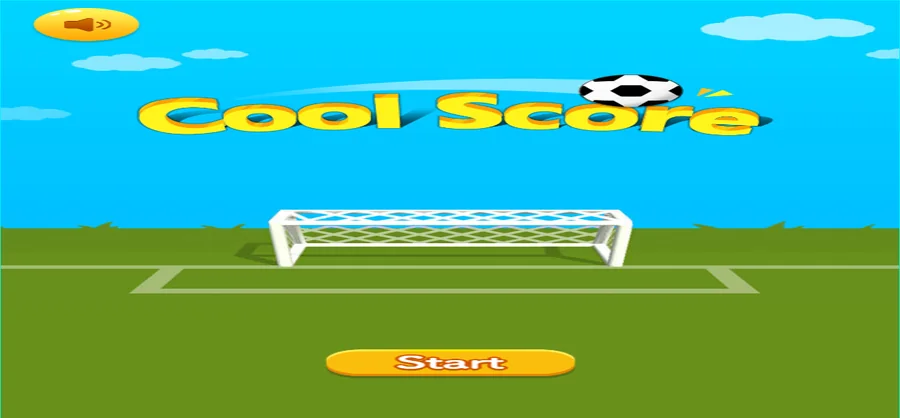
Cool Score is served inside the external game player, and this brief records that page: the game title card, a single orange Start button, and no counters of any kind. Everything else here comes from the build package rather than the screen.
LevelLoop wrote this play brief. The playable file, artwork, and runtime are delivered by an external game service. LevelLoop keeps supporting rights records for the catalog on file.
ShelfSports
The page as it opened
A title card and one Start button
The player page frames the game in its own shell: a back link, an EXTERNAL GAME PLAYER label and an Open game player heading sit above the frame. Inside it the game shows one screen — a yellow Cool Score logo over a goal and a ball, with a single orange Start button below.
Observed 2026-10-04 in Chrome at 1280×800: the Cool Score title card and its single orange Start button, with no counters anywhere on the page.
Nothing on this page counts
This screen carries no score, no clock, no level number and no coin readout. Start is the only control, so the honest first-run note is where to press and what happened afterwards: in the observation above, the frame still showed the same goal and ball after Start was pressed.
What the build contains
Ball, runner, doors and obstacles as separate parts
The package behind the button is a LayaAir build whose script bundle names its own parts. BallController and HumanController handle the ball and the runner, DoorController and ObstacleController handle the goal mouth and the obstacles, JoyController drives the on-screen stick, and all of them sit under GameMainController and GameViewController.
A level manager and a camera behind them
GameLevelManager, LevelRefresh and SmallLevelRefresh describe a level list that is rebuilt as you progress, and CameraController keeps the frame on the action. Skins are split the same way: BallSkinManager and HumanSkinManager handle unlocks, with CHANGEBALL and CHANGEHUMAN as separate calls, and the package also carries one kick sound, Ball_Kick.mp3.
The UI set is large for a page that shows one button: PlayBtn, ReviveViewUI with ReviveBtn, ShopViewUI, EggDialogUI, SignupDialogUI with SignDay, SignTip and Signed, RankDialogUI with WorldRank and FriendRank lists, plus WinViewUI and FailViewUI.
If Start does not begin a run
What to check before moving on
A page that stays on its title card is a hosting problem rather than a gameplay problem, and nothing on this screen tells you which one it is. Press Start, wait through any loading art, and if the same goal and ball are still there, no run has started yet.
What is confirmed either way
Two things are solid from this observation. The game prints its own name, Cool Score, on the title card, and the only start control is the orange Start button. Everything named in the section above comes from the build bundle rather than from the screen, so treat those names as structure and not as instructions.
New-player guidance does exist inside the package: NewPlayerFinger, NewPlayerTap and a GuideLinePrefab are what a first run would draw once the frame starts, alongside a level list that refreshes as you move through it.
Cool Score FAQ
The page, the button and the build
These answers stay with what the page shows and what the package contains: one title card, one Start button, and a bundle of named controllers.
What does the Cool Score page show?
The game title card with the yellow Cool Score logo over a goal and a ball, plus one orange Start button, inside the external game player frame.
Is there a score or timer on the first screen?
No. The first screen carries no score, no clock, no level number and no coin readout. Start is the only control on it.
What happens after pressing Start?
In the observation on 2026-10-04 the frame did not change. If the same goal and ball are still on screen after a wait, the run has not started.
What is Cool Score built with?
A LayaAir package. Its bundle names BallController, HumanController, DoorController, ObstacleController and JoyController under GameMainController and GameViewController.
How many screens does the game itself show here?
One: the title card. The page around it belongs to the external player shell (Back to games, EXTERNAL GAME PLAYER, Open game player).