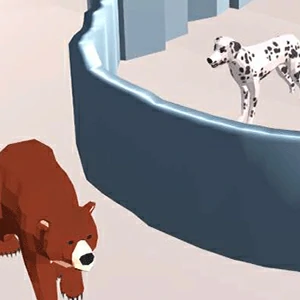
A drawing puzzle on a snowy low-poly map: the screen asks you to Draw line to protect the dog, then releases whatever you drew to hold a bear away from it.
LevelLoop wrote this play brief. The playable file, artwork, and runtime are delivered by an external game service. LevelLoop keeps supporting rights records for the catalog on file.
ShelfPuzzle
The first screen and the first line
The game states the whole rule in one sentence
Protect The Dog 3D starts on a loading bar under an isometric cube icon and stays there while the map loads. When the level appears, the instruction is at the bottom of the screen in plain words: Draw line to protect the dog, written next to a yellow gloved hand cursor.
Observed 2026-10-04 in Chrome at 1280×800: a level in play. A snowy low-poly map holds a brown bear, a white spotted dog and a dashed guide waiting to be drawn over; the top bar carries three yellow stars with 1/1, the top-right counter reads 0, and the bottom prompt reads Draw line to protect the dog.
What the HUD shows before you draw
The top-left corner holds a settings gear and a restart icon. The top bar carries a progress strip with three yellow stars and the label 1/1. The top-right corner holds a green counter that starts at 0. Nothing on that bar is a clock, so a level is not timed.
The scene itself is the brief: a snowy low-poly map with pine trees and grey rocks, a brown bear closing in from one side, a white spotted dog on the other, and a dashed guide line on the ground showing where the drawing is expected to go.
What the line has to do
A drawn barrier, not a placed one
The build names its own drawing system DrawWalls, and its dog is driven by DogControllerHorizontalDrawing and 6HorizontalNewDogController variants. So what you trace becomes a wall in the physics scene rather than a decoration, and the dog is the object that has to survive what happens next.
The hazards are animals, not traps
The dangers are named directly. Two of the build's own buttons read KILL BEAR and KILL SHARK, so both are threats the barrier is meant to stop. The bear ships in two skins, Bear Skin Brown and Bear Skin Panda, with its own Bear Animations set and a DogBone rig for the dog.
Maps rotate through themed dressings: the level objects include Case Blue, Case Gray, Case Purple, Case Red and a Case Day 2, laid over 9 numbered grounds (Ground 2 through Ground 10) and 3 floor decks (Floor 1 to Floor 3). One case carries a Boat 1, one an Eagle 1, and one a HeliPlatform 1 with Freightlift cable segments, so the surface you can anchor a line to is not the same shape on every map.
Stars, shop and bonus rounds
What sits around a level
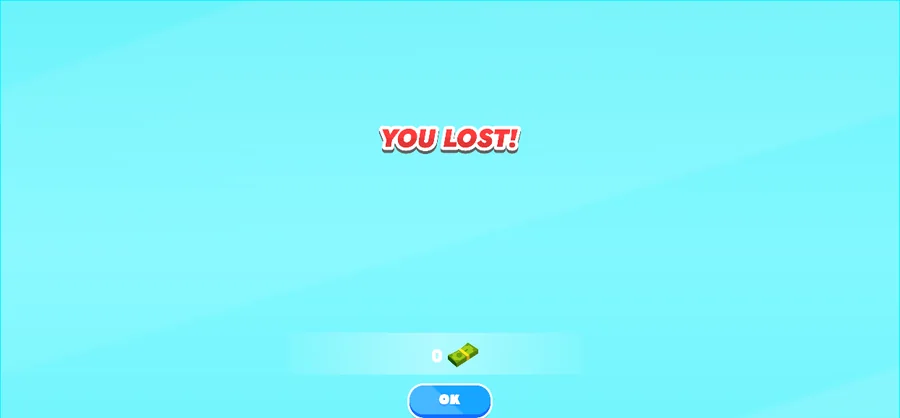
A cleared level pays out through a LEVEL COMPLETED screen with a Green Button Next, and a failed one ends on red YOU LOST! text over a single blue OK button — observed at the end of an attempt in Chrome. The build carries LEVEL COMPLETED and LEVEL FAILED as its two outcome labels.
Shop, bonus levels and the board
Coins feed a store: the build carries a DOG SHOP panel with a ShopController and a ShopIconsAB icon set, and skins are split into clothes and skin layers — Builder, Businessman, Cook, Doctor and Fireman each ship as both. A bonus mode is wired separately as BONUS LEVEL with a GO TO DOG'S ZONE button, and unlocked mini-games run through an UnlockMinigameController.
Everything else is the usual shell: a LeadboardCanvas leaderboard with a TOP WORLD heading, a reward window handled by RewardWindowController, a settings panel named SettingsPannell, a rating prompt from RateUsView that asks Enjoying Test Game? in its own words, and an ad-reward flow behind WinABController. The build reports its own product version as 1.0. One closing note from the loader: the frame is not blank while it waits — it is the loading bar and the cube icon, and the level only appears once that bar completes.
Protect The Dog FAQ
Lines, stars and the shop
These answers follow the on-screen prompt and the build's own naming: one drawn barrier, a three-star top bar, and a coin counter that starts empty.
What am I actually asked to do in a level?
The bottom of the screen says it in one line: Draw line to protect the dog. A dashed guide shows where the drawing is expected, and the build names the system that turns your trace into a physics wall DrawWalls.
What is the 1/1 label at the top?
It sits in the top bar beside a progress strip with three yellow stars, and it is separate from the green counter in the top-right corner that starts at 0. Nothing on that bar counts time, so a level is not timed.
What threatens the dog?
Two animals are named on the build's own buttons: KILL BEAR and KILL SHARK. The bear ships in Brown and Panda skins, so the hazard you have to wall off is part of the scene rather than a trap you place.
What happens when a level ends?
A failure shows red YOU LOST! text above a single blue OK button, which is what the observed attempt ended on. A clear runs through a LEVEL COMPLETED screen with a Green Button Next, and the build also carries a LEVEL FAILED label.
What can the coins be spent on?
Skins. The build carries a DOG SHOP with its own ShopController and icon set, and the outfits are split into clothes and skin layers: Builder, Businessman, Cook, Doctor and Fireman each ship as both.