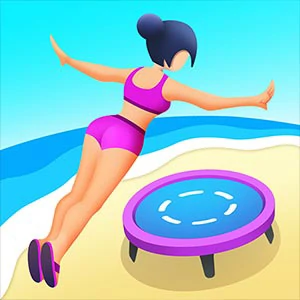
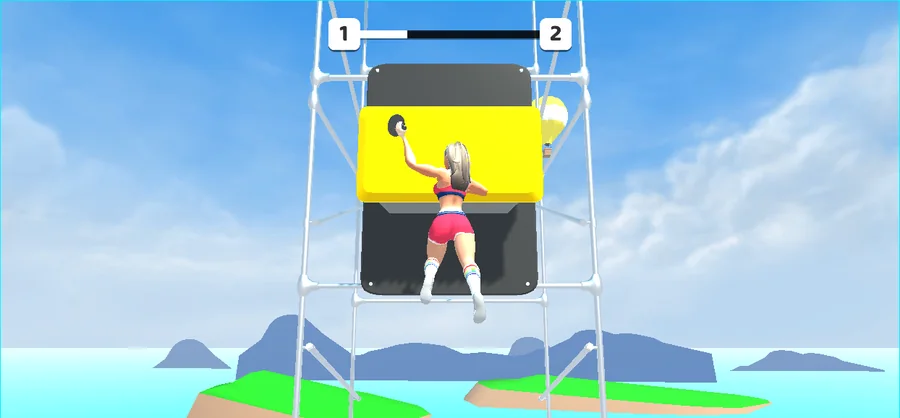
A hand-over-hand climb across scaffolding: the screen begins with CLICK TO GET STARTED and every grab is prompted with PUSH TO CLUTCH as the climber swings between holds.
LevelLoop wrote this play brief. The playable file, artwork, and runtime are delivered by an external game service. LevelLoop keeps supporting rights records for the catalog on file.
ShelfArcade
The two prompts at the top of a run
CLICK TO GET STARTED, then PUSH TO CLUTCH
Climber Jump opens on a low-poly sand island: a girl in sportswear stands with a dumbbell in front of a white metal scaffolding frame, and the only words on screen are CLICK TO GET STARTED. There is no mode list and no difficulty choice on that frame, so the phrase is the whole menu.
Observed 2026-10-04 in Chrome at 1280×800: mid-climb. The climber hangs from a yellow panel on the white scaffolding with PUSH TO CLUTCH centred on the screen; the same session opens on a low-poly sand island under the prompt CLICK TO GET STARTED, and an attempt ends with a thrown ball and a counting readout above the target.
The second prompt is the grab
The moment the climb starts, the wording changes to PUSH TO CLUTCH. A third line carried by the same build, TAP TO CONTINUE, keeps the vocabulary consistent: click to begin, push to hold on, tap to move along. The build reports its own version as 0.1.
The climber is a real rigged character rather than a sliding shape. The build ships her as Char_girl with a matching avatar and a full body hierarchy — LeftArmRig, LeftLegRig, LeftArmMover and LeftLegMover sit alongside pose targets for the right hand and both legs, and IKHand, IKLimb and IKPoseController drive the reach. A grab is an animated hand closing on a hold, which is why the prompt says push rather than aim.
Left hand, right hand, repeat
The climb alternates hands
The build names its own animation states, and they describe the loop in plain terms. The climbing set runs Left_Fix, Left_Fly, Left_Pulling and Left_jump against Right_Fix, Right_Fly, Right_Pulling and Right_Jump, all entered from Jump_Up_1 and returning to Falling Idle when nothing is held.
Falling, landing and standing are separate states
A missed hold is modelled rather than skipped: Hard Landing, Idle_Standing_3 and a Victory Idle at the top of a climb. The floor carries its own FloorTrigger and a gravity weight value, so the game distinguishes hanging, dropping and standing on solid ground without you thinking about it.
The scaffold itself is assembled from named modules: 3 entry pieces (Module_E_1 to Module_E_3), 4 hanging pieces (Module_H_1 to Module_H_4) and 4 mixed pieces (Module_M_1 to Module_M_4) next to Module_Empty and Module_Finish, with FrontBlock_1 through FrontBlock_3 and colour-coded panels called PlaneGrey, PlaneRed and PlaneYellow. Where a grab connects is stored in hanging data — HangingDataSO, HangingLeft and HangingPivot — so the yellow panels you see are pivot points, not decoration.
Eleven levels and a finish line
What the build ships around a climb
The level prefabs are named Level_1 through Level_11, so a finished climb chain runs 11 levels, each fed by a LevelDataSO asset through a LevelGenerator. The end of a run is handled by FinishBlock with FinishSuccess and FinishFail outcomes, and the shell around it is NextLevelCell and CurrentLevelCell under a LevelTitle, with a ProgressBar and a NumberText readout for the current level.
Targets, resets and the scoreboard
The target in front of the climber is a yellow-and-black board, and above it sits a small counting readout — the observed attempt shows 1 and 2 — while the aiming feedback is drawn as a MotionLine from the hand to the mark. A dedicated Reset Button exists for an attempt that goes wrong, and the build carries a GameplayTutorial step plus an EndScreen overlay, so a first run is meant to be taught rather than guessed at.
This is a Unity WebGL build with its own product version 0.1 and credits QAP Games, and the canvas is painted over a background image rather than a flat colour, which is why the first frame is already a scene rather than a blank stage.
Climber Jump FAQ
Prompts, holds and level count
These answers use what the screen shows and what the build names for itself: two prompts, an alternating hand loop, and eleven named levels.
How does a Climber Jump run begin?
The screen shows CLICK TO GET STARTED over a low-poly sand island, with the climber standing in front of the scaffold holding a dumbbell. Clicking that text is the only way in; there is no mode list on the frame.
What does PUSH TO CLUTCH mean?
It is the grab prompt that replaces the start text once the climb begins. The climber reaches for the yellow panels on the scaffolding, and the build drives the reach with its IK hand system, so the prompt is asking you to hold on rather than to jump.
How many levels are there?
Eleven named level prefabs, Level_1 through Level_11, each loaded from a LevelDataSO asset by the build's LevelGenerator. The menu around them uses NextLevelCell, CurrentLevelCell and a LevelTitle header.
What happens when a hold is missed?
The build has Falling Idle and Hard Landing states for it, and a run ends through FinishBlock with either FinishSuccess or FinishFail. A Reset Button restarts an attempt that has gone wrong.
What is the number above the target?
A small counting readout on a yellow-and-black board in front of the climber; the observed attempt shows 1 and 2. The build draws the aim as a MotionLine from the hand, and reports the level through a NumberText label.