LevelLoop wrote this play brief. The playable file, artwork, and runtime are delivered by an external game service. LevelLoop keeps supporting rights records for the catalog on file.
ShelfRacing
Splash and controls
The splash shows one button, and the run behind it is a side-scroller
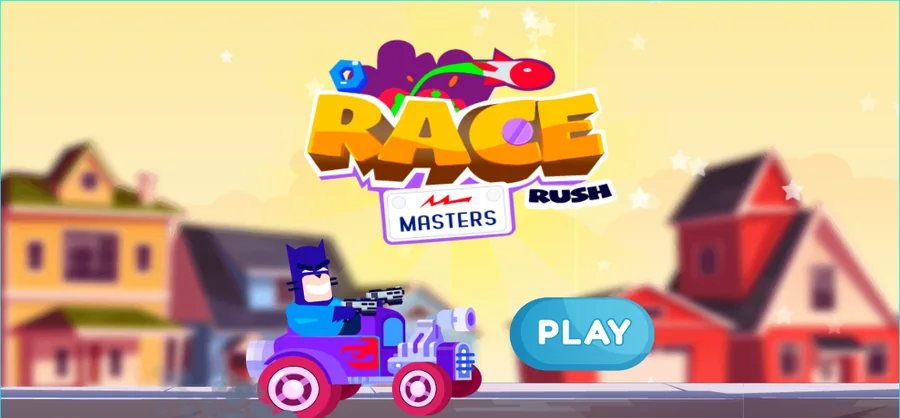
The splash is the whole of what this capture can vouch for. It holds the RACE MASTERS RUSH logo, set with RACE in yellow, MASTERS inside a white box and RUSH in black, over a cartoon kart on a suburban street, and exactly one teal PLAY button. Three separate captures, at the title, after a click and after input, are the same frame, so nothing further loaded in the recording.
The build itself is more talkative. Its project file names 5 scenes: L_Preloader, L_MainMenu, L_PreIngame, L_InGame and L_Tutorial. The run is L_InGame, and it renders at 1280 by 650.
Observed 2026-10-04 in Chrome at 1280×800: the splash holds the RACE MASTERS RUSH logo over a cartoon kart and one teal PLAY button, and it was still on screen after a click and after input.
Three touch buttons, or the keyboard
L_InGame carries 22 layers, and their names describe the run rather than a road: a character layer between two revolver layers (LyrRevolver1 and LyrRevolver2), an enemy layer, a ground layer, an effects layer, a UI layer, a pause layer and a result layer. Nothing in that list is a lane, a track or a rival vehicle.
Input is a three-button control. The mobile layer places one button at x=87, one at x=273 and one at x=1207, which is a left, a right and a jump, and it hides all three while the build's isMobile flag is 0. The desktop layer holds the keyboard set instead. The character itself runs on a platform behaviour, so the run is a runner with jumps, not a steering game.
What the run keeps and spends
A 100-point life bar, an ammo bar and a best distance
The run keeps four numbers. Health is a global set to 100, and the bar that shows it is a fill 87 pixels wide and 10 tall drawn on a 572 by 142 housing. The build scales that fill to current health divided by 100, times 87, so the bar only empties when the run does.
Ammo and coins are separate counters
Ammunition has its own housing, 590 by 169, with the same 87 by 10 fill pattern, which means shooting is rationed independently of taking damage. Coins sit in a third bar, 578 by 157, beside a coin counter, and the global it reads starts at 0.
The fourth number is distance. When the run ends, the result layer writes the best figure with the unit attached, in metres, so the build stores a best distance rather than a lap time or a finishing position. That global also starts at 0.
Between runs there are 9 item slots and 4 weapon slots to fill. The item panel is a 1300 by 734 sheet of price buttons with a price label pinned to each one, so items are bought rather than unlocked by distance.
How the run escalates
Spawn timers, enemy types and the weapon table
The pressure comes from timers rather than a level length. On entry the build arms three of them: an enemy spawn set to 2 seconds, a difficulty step set to 20 seconds and later 30, and a background piece set to 4.5 seconds. The difficulty step is the one that matters, because it is a separate timer from the spawn, so the run gets harder on a schedule of its own.
Six enemy types, seven upgrade rows
Enemies come in 6 types of their own plus a separate enemy bullet, and the run also carries traps.
Weapon power is not a single number. The build fills a power table on entry with 7 rows per weapon, and the first weapon's rows start at 340 and climb by 10 per row, ending at 400. Reaching the top of that table is what a weapon purchase buys.
Everything else in the run hangs off the UI layers: a pause layer with 4 buttons (play, retry, home and sound) and a result layer carrying the score, the coin total and a marker reading 100. The behaviours attached to the run are a platform, a bullet, physics, a sine motion, a tween, a pin, a move-to, a rotate and a flash, which is the toolkit of a scrolling shooter rather than a racer.
Race Masters Rush questions
The PLAY button, the 100 health and the metres
These answers stay with what the splash showed and with the numbers the game's own project file carries: the three-button control, the life and ammo bars, and the distance the result screen reports.
What does the Race Masters Rush splash show?
A logo with RACE in yellow, MASTERS in a white box and RUSH in black, over a cartoon kart on a suburban street, and one teal PLAY button. Three captures, at the title, after a click and after input, are the same frame, so the splash is all this capture shows.
Does Race Masters Rush use lanes or steering?
No. The game's own project file puts three touch buttons on the run's mobile layer, at x=87, x=273 and x=1207, which is left, right and jump, and the character uses a platform behaviour. There is no lane object, no track object and no rival position anywhere in the run's data.
How much health does the run give me?
100 points. The bar that shows it is an 87 pixel wide, 10 pixel tall fill on a 572 by 142 housing, and the build scales the fill to current health divided by 100 times 87, so it empties exactly when the run ends.
What is the score measured in?
Metres. The result layer writes the best figure with the unit attached, so the build stores a best distance rather than a lap time or a finishing place. Ammo runs on its own bar, 87 by 10 on a 590 by 169 housing, and coins on a third bar, 578 by 157.
What do the item and weapon slots buy?
There are 9 item slots and 4 weapon slots. Items come from a 1300 by 734 shop sheet of price buttons, and weapons upgrade along a power table the build fills with 7 rows each: the first weapon starts at 340 and climbs by 10 per row to 400.