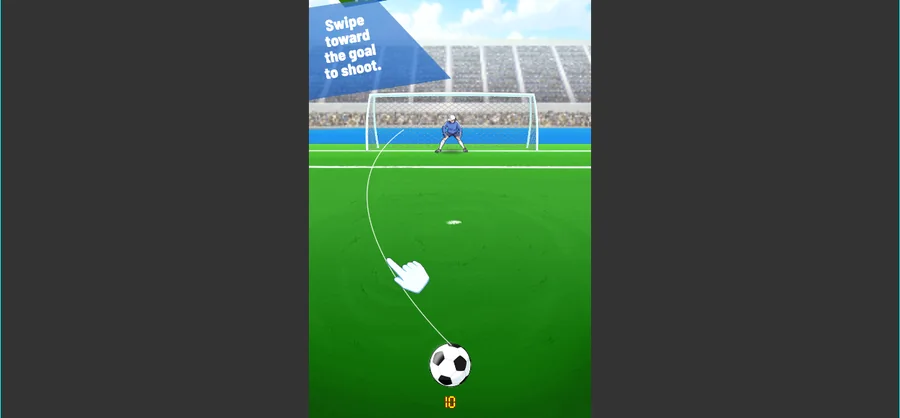
Fierce Shot plays in portrait, and the first thing it establishes is a scoreboard: 45:00 on the match clock, both sides showing the name team1 and a score of 00, a speed readout of 0 km/h and a POWER SHOT bar under them. The field carries one instruction, Swipe toward the goal to shoot.
LevelLoop wrote this play brief. The playable file, artwork, and runtime are delivered by an external game service. LevelLoop keeps supporting rights records for the catalog on file.
ShelfSports
The scoreboard
Forty-five minutes, both sides on 00
Fierce Shot plays in portrait, and the first thing it establishes is the scoreboard across the top: a match clock reading 45:00, one name on each side, a score under each name, and VS between them. Beside the bottom of that board sit a speed readout of 0 km/h and a green POWER SHOT bar.
Observed 2026-10-04 in Chrome at 1280×800: the scoreboard opens on 45:00 with both sides named team1 and 00 on each score, over a 0 km/h readout and a POWER SHOT bar.
Both sides share one name
Both halves of the scoreboard read team1, and both scores read 00. That is the placeholder the build prints until a real name is set, so a first match shows the same name twice rather than two different teams.
One more number is printed on the field: an orange 10 at the bottom centre, below the bat and the ball. Nothing on the screen labels it, so the safe reading is where it sits rather than what it counts.
The one instruction on the field
Swipe, and the power bar answers
The screen gives exactly one instruction, printed across the lower half of the field: Swipe toward the goal to shoot. A white cartoon hand with a thin line to the ball is drawn at the bottom centre to show the gesture, which is why the first frame of a match is a still ball rather than a moving one.
Speed and the power bar
Two readouts answer the shot. The speed value sits at 0 km/h while the ball has not been sent, and the green POWER SHOT bar sits beside it. Together they are the only feedback the field gives about a strike before the ball leaves the boot.
The build's match furniture
A league, a name and three result screens
The build is organised into four scenes: Loading, InputName, League and Game. A run therefore starts by taking a name and choosing a competition before the match scene itself is loaded.
Seven configuration files
The match is driven by seven config documents shipped with the build: Level.json, LevelDesign.json, FreeKick_Levels.json, Score_system.json, Skills.json, SpecialSkills.json and Rewards.json. Level data, scoring, ordinary skills, special skills and rewards are therefore tuned separately rather than from one table.
The result side has three separate images — FierceShot_UI_AP_results-win.png, -lose.png and -draw.png — so a match can end in a draw as well as a win or a loss. A miss has its own ten-frame animation, Gameplay_AnimeMoment_0 through _9, next to a single miss.png. The pitch art names its own parts too: ground_penalty1 and ground_right1 for the areas, and fence0 and fence1 for the barriers.
Fierce Shot FAQ
The clock, the teams and the shot
These answers stay with what the scoreboard prints and what the build ships: a 45-minute clock, two placeholder names, one swipe instruction and three result screens.
How long is a Fierce Shot match?
The match clock on the scoreboard reads 45:00, and it sits between the two team names with VS underneath.
Why do both teams have the same name?
Both halves of the scoreboard read team1 and both scores read 00. That is the name the build prints until a real one is set, so a first match shows the same name on both sides.
How do I shoot?
The field prints one instruction: Swipe toward the goal to shoot. A white cartoon hand with a line to the ball is drawn at the bottom centre to show the gesture.
What is the orange 10 at the bottom of the field?
It is the only other number printed on the field, at the bottom centre below the ball. Nothing on screen labels it, so its exact meaning is not confirmed by this observation.
How can a match end?
Three ways: the build ships separate result images for a win, a loss and a draw (FierceShot_UI_AP_results-win, -lose and -draw).
What does a run pass through before the match?
Two scenes: InputName and League. The build is organised as Loading, InputName, League and Game, so a name and a competition are set before play.