LevelLoop wrote this play brief. The playable file, artwork, and runtime are delivered by an external game service. LevelLoop keeps supporting rights records for the catalog on file.
ShelfPuzzle
What the first board actually shows
Level 1 is eight tiles and four pairs
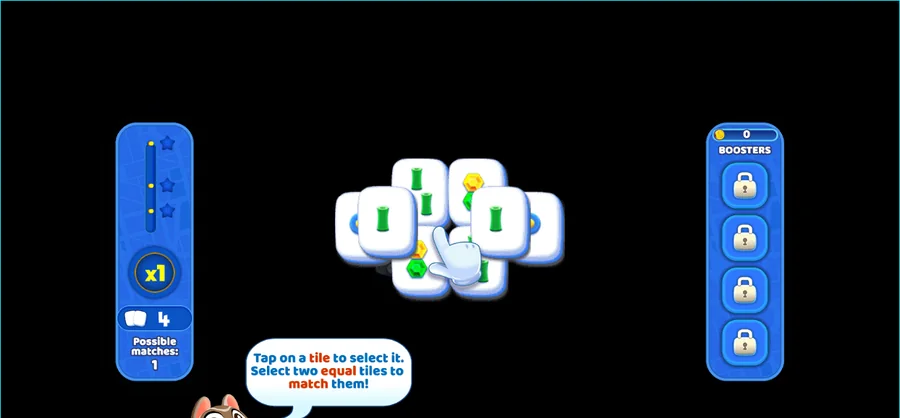
The board you meet is small, and the game's own level table says exactly how small: level 1 of the first map carries eight tiles in four pairs, drawn only from bamboo 1, bamboo 3, dots 1 and characters 2. Six of those tiles sit on layer 0 and two sit above them on layer 1.
Observed 2026-10-04 in Chrome at 1280×800: eight tiles on the opening board, the left rail reading x1, a tile badge of 4 and Possible matches: 1, the match tutorial in a speech bubble, and BOOSTERS on the right with four padlocked slots.
The board states its own rule
A speech bubble covers the field from the first second. It reads Tap on a tile to select it. Select two equal tiles to match them! and then narrows the rule: Select tiles that have no tiles above it and on it's right or left side. The level goal printed with it is simply Clear all the tiles!
The left rail is short and worth reading before you touch anything: a three-step star bar, a round combo dial showing x1, a tile badge showing 4 against the eight tiles on the board, and Possible matches showing 1. One of the four pairs is legal when the board opens.
Free tiles, layers and the wild suits
Only free tiles can be picked
Availability is the whole game. A tile is pickable when nothing rests on top of it and nothing sits against its left or right side, which is why a pair whose faces match can still be untouchable. The six layer-0 tiles on level 1 are all walled in by the two layer-1 tiles until those two come off.
Boards run up to six tiles deep
Depth grows quickly after the first level. Across the 50 boards in the game's opening map, tile layers run from 0 to 5, so a late board can be six tiles deep, and board size ranges from 8 tiles on level 1 up to 146 tiles elsewhere in the same map.
Seven suits feed the boards: bamboo, characters and dots, plus winds, dragon, flowers and seasons. Flowers and seasons do not need matching faces: They don't need to be equal to be matched, and the only restriction is that seasons with seasons and flowers with flowers pair up. Every other match wants two identical faces.
Goals, clocks and the booster rail
Six of the first fifty boards run on a clock
Pair-clearing is not the only goal. Of the 50 boards in the opening map, 20 ask you to clear every pair, 20 ask for a set number of golden tiles and 10 ask you to free a set number of toys. The gold targets range from 2 to 23 tiles and the toy targets from 1 to 20.
Six of those 50 boards carry a timer, set at 150, 150, 190, 200, 300 and 320. When one of them comes up the board warns you: This level has a timer! You have to clear the level before the timer runs out! Every board hands out three star tiers, counted from within the level: level 1 pays a star at 8, 20 and 40, while the fiftieth board of the map pays at 470, 1,550 and 1,880.
Four slots, seven boosters, seven unlock levels
The rail on the right of the board holds exactly four boosters: Flashlight, Magnet, Fireworks and Shuffle. All four are padlocked on a new save, because the build unlocks them at levels 9, 21, 6 and 16 respectively. Three more boosters live outside that rail: the Magnifier hint at level 15, a Time booster that adds 30 seconds at level 31, and extra lives.
List prices sit in the same table: Flashlight 100 coins for a ten-second sweep, Magnifier 200, Magnet 300, Time 300 for 30 more seconds, Fireworks 400 to clear three tiles, Shuffle 500, and a life for 100. When a board genuinely stalls the game prints No moves left. and offers Use a Shuffle to finish this level. A blocked board also pays out a fixed 50 coins.
There is more room than the first map suggests. The build ships 14 maps and computes its last level index from them: the first twelve carry 50 boards each and the final two carry 60, for 720 boards in total.
Mahjong Story 2 FAQ
The opening board, free tiles and boosters
These answers stay with what the board and the shipped level table actually contain.
How many tiles are on the first board?
Eight, in four pairs. The level table gives level 1 exactly eight tiles across two layers, using only bamboo 1, bamboo 3, dots 1 and characters 2. The left rail agrees: its tile badge reads 4 for the four pairs and Possible matches reads 1, so only one pair is legal when the board opens.
Which tiles can I select?
Only tiles with nothing above them and nothing against their left or right side. The board states the rule itself: Select tiles that have no tiles above it and on it's right or left side. A matching face does not help if something still rests on the tile.
What are the four padlocked slots on the right?
That is the booster rail. The build's booster list holds exactly four entries: Flashlight, Magnet, Fireworks and Shuffle. They unlock at levels 9, 21, 6 and 16, so a fresh save starts with all four locked and nothing to spend.
Do flowers and seasons have to match exactly?
No. A season pairs with any season and a flower with any flower, whatever the face shows. The board says so directly: They don't need to be equal to be matched. Every other suit still needs two identical faces.
How many levels does the game ship?
720. The build carries 14 maps; the first twelve hold 50 boards each and the last two hold 60. Board depth reaches six layers, and the opening map alone ranges from 8 tiles on level 1 to 146 tiles later on.