A black-hole collection game: steer the hole across a junk-filled lot, swallow the debris in its path and reach the level's value target. Three upgrade tracks, ten levels.
LevelLoop wrote this play brief. The playable file, artwork, and runtime are delivered by an external game service. LevelLoop keeps supporting rights records for the catalog on file.
ShelfArcade
The screen before the first level
The opening board has three buttons and one level name
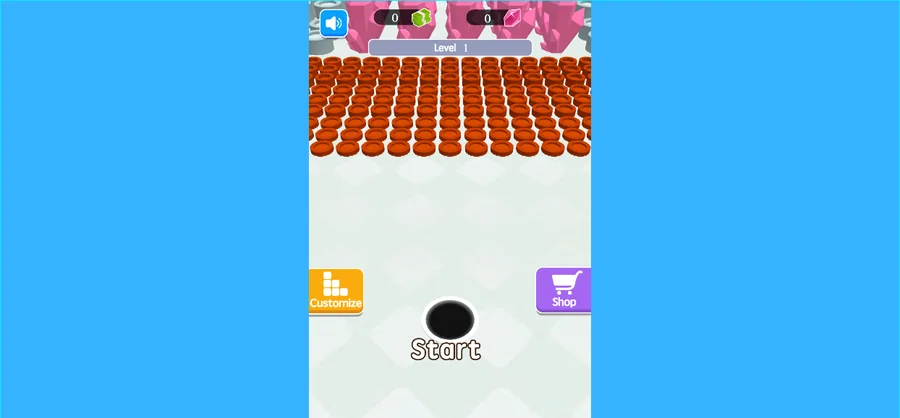
There is no separate title screen to scroll past. The first frame that fills the canvas is already the board you will spend the session on: Customize, Start and Shop sit along the bottom, a grey Level 1 plate sits on the centre line, and rows of ring-shaped debris wait in staggered rows above the hole. A sound button and two resource counters ride at the top; on a fresh save the counters show no digits at all, because there is nothing to count yet.
Observed 2026-10-04 in Chrome at 1280×800: the portrait canvas letterboxes inside a wider player, with a sound button and two resource counters across the top, a Level 1 plate on the centre line, Customize, Start and Shop along the bottom, and staggered rows of ring debris waiting above the hole.
What the first level is built around
The build names its own opening level. Level 1 is level_01, and its entry carries a target value of 810, a first spawn after 10 seconds, a new item every 10 seconds after that, and an item_exist_time of 20 seconds before a spawned piece disappears. Beating it pays 200 reward diamonds.
The hole, the load and the three tracks
Everything you swallow is priced, and the shop sells three ways to swallow more
The game is a black-hole collection loop. You move the hole, junk in its path is swallowed, and progress is measured against a cumulative value target. That target is what ties the run together: the build carries ten level entries, six campaign levels plus four custom ones, and each entry declares a pass value and the pass value is not the same number twice — 810 for level 1, 700, 580, 1400, 400 and 730 across the campaign set.
The hole itself is a levelled object
Three tracks describe the hole, and the Chinese shop titles are the plain ones: capacity upgrade, size upgrade and speed upgrade. Each is a 20-step table. Capacity runs 20 to 400 units in steps of 20. Size runs radius 5 to 43, gaining 2 per step in the early levels and 3 near the top. Speed runs 10 to 68, gaining 4 per step at first. All three share the same price ladder: 15, 40, 90, 150, 200, 300, 400, 500, 600, 800, 1000, 1200, rising to 4000 at step 20.
Each swallowed item has a price and a bulk
The item table holds 40 entries. Every one carries a radius, a capacity cost and a sell price, and the three numbers disagree in useful ways: the cheapest pieces sell for 1 coin and cost 1 capacity, while the diamond and car entries run to a sell price of 50 or 60 and take as much as 8 capacity each. A hole that swallows the nearest junk is not the same as a hole that swallows the profitable junk.
Turning a first run into a first purchase
The first upgrade costs 15 and the ladder climbs fast
Start here: an early swallowed piece is worth 1 coin and a first upgrade on any of the three tracks costs 15. That is a real gap, and it is the number that decides your opening route — you need volume of cheap junk before the shop becomes interesting, so the first leg of the level is about coverage, not precision.
Read the level against the track you own
Level 1 wants 810 and gives 20 seconds of life to each spawned piece. Compare that with your own dials: a base capacity of 20 units and a base radius of 5 mean a small mouth and a small hold, so most of the 810 arrives while you are still sweeping. If runs keep ending with an empty hole in a messy lot, the size track is the one that raises how much each pass touches; if runs end with a full hole while junk is still lying around, it is capacity.
Where the rest of the money sits
The build carries more than one currency. Upgrade steps are priced in coins, a level pass pays reward diamonds, and the skins behind the Customize button start at zero cost for the default hole and 2000 for the five premium ones. A daily sign-in table pays 100, 300, 500, 800 and 1600 across the week, with a skin on day two and a retired skin on day seven, so the idle days pay for the ladder rather than the wardrobe.
First-run decisions
Levels, items and the shop
Before the first run, decide what you are buying with it: volume through the cheap junk for a 15-coin upgrade, or position around the profitable pieces under the 20-second spawn clock. Both are measurable inside one level.
What do the three buttons do?
Customize opens the hole-skin list, Start begins the level, and Shop is where the coins go. The skin list is eight holes long: the default one is free and five of the others are priced at 2000, so a new save has nothing to unlock and only Shop matters on day one.
How many levels does the game have?
Ten entries: six campaign levels with their own scenes and four custom ones named Gold light and Destroy parking lot, credited to Jack A and Omni-man. The campaign pass values are 810, 700, 580, 1400, 400 and 730 in play order.
What is worth swallowing first?
Price divided by bulk is the honest comparison, and the table spreads it widely: 1 coin for 1 capacity at the bottom, up to 60 coins for 6 capacity near the top. Cheap rings keep the hole moving; the heavy diamond pieces are worth a detour only if your radius already reaches them.
How long does a spawned piece last?
Twenty seconds. The first one appears after 10 seconds and the level keeps generating on a 10-second beat, so a pass value of 810 is a matter of how much of that stream you catch rather than how hard you steer.